Create a Permanent Dynamic QR Code with Tawseel Online
Create a Permanent Dynamic QR Code with Tawseel Online
With Tawseel Online Dynamic QR Codes, you can create one QR code that stays with you permanently, even if you change your phone number, business location, contact information, website, or any other details.
🔗 One QR Code, An Editable Destination Anytime
Your dynamic QR code stays the same, so you do not need to create or print a new QR code every time your information changes.
Simply log in to your Tawseel Online account and update the destination URL whenever you want. Your QR code remains unchanged and continues to work.
You can change:
- 📱 Phone number
- 📍 Business location or address
- 🌐 Website or landing page
- 💬 WhatsApp link
- 📧 Contact information
- 🛍️ Product or online store link
- 📲 Social media profiles
- 🔗 Any other URL
How Does a Dynamic QR Code Work?
Unlike a static QR code, which cannot be changed after it is created, a dynamic QR code uses an editable destination.
This means that the QR code itself never changes. You can print it on a business card, product, advertisement, sticker, or other marketing material and continue using it for the long term. If your information changes, simply update the destination from your Tawseel Online account.
Create it once → Print it → Share it → Change the destination whenever you want.
🚀 Why Use a Dynamic QR Code from Tawseel Online?
A dynamic QR code is ideal for businesses and individuals who need to update their information regularly without having to reprint their marketing materials.
You can use your dynamic QR code on:
- 💼 Business cards
- 📦 Product packaging
- 🏪 Storefronts
- 📢 Advertisements and signs
- 📰 Flyers and brochures
- 🍽️ Restaurant menus
- 🚗 Vehicles
- 🛍️ Products and online stores
- 📱 Social media
- 📇 Marketing materials
🔄 Change Your Information, Not Your QR Code
Moved to a new location?
Changed your phone number?
Have a new website?
Want to send customers to a different product or page?
You do not need to create a new QR code.
Simply update the destination URL from your Tawseel Online account, and the same QR code will continue to work.
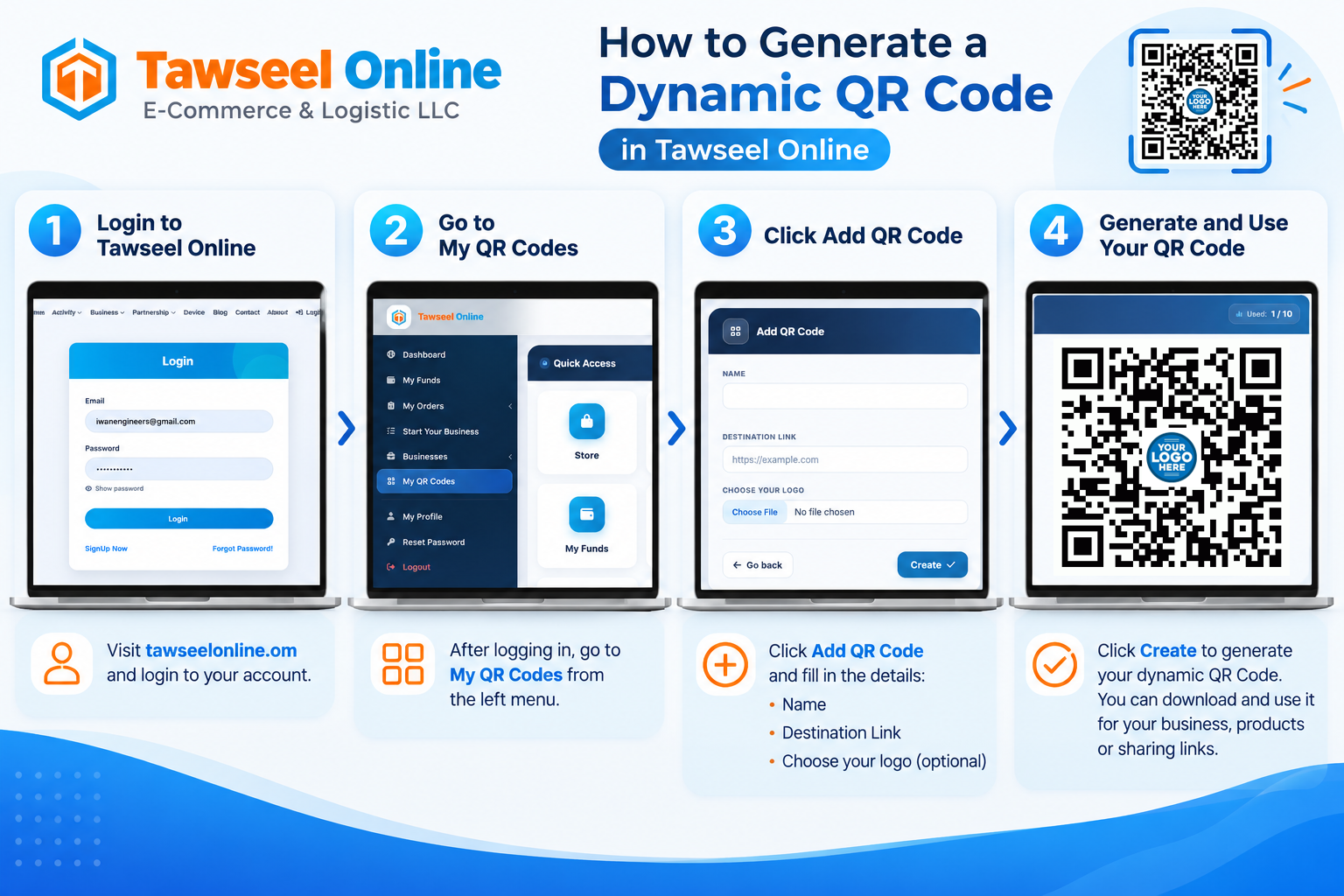
📲 How to Create a Dynamic QR Code
- Log in to your Tawseel Online account.
- Go to My QR Codes.
- Click Add QR Code.
- Enter your QR code name and destination URL.
- Add your logo if you want.
- Click Create.
- Download your QR code and use it wherever you need.
🔐 One QR Code for Your Future Needs
With a Tawseel Online Dynamic QR Code, you do not need to print a new QR code every time your information changes.
Your QR code stays the same, while you can update its destination whenever your needs change.
Tawseel Online – Smart and Flexible QR Codes
Whether you are a business owner, online store, restaurant, retailer, or independent professional, Tawseel Online provides an easy and flexible way to create a dynamic QR code that can be updated without creating a new QR code.